
Summary Reports on SharePoint
Summary reports are files that are made available to you on SharePoint for each of the annual interviews/surveys administered for the National Evaluation, child assessments and class observations, and child and staff turnover.
This includes the Fall Parent Interview, Spring Parent Survey (Parent section and Child Section), and the Spring Staff Survey.
Beginning in 2026, some reports are provided in excel as well as rtf format.
See below for details of what is included in the reports.
Where can these be found?
In your site’s folder in the Educare Library Sync on SharePoint. Sign in with your UNC ONYEN and password.
The file path will look something like: Educare Library Sync > [site abbreviation] > Reports > [school year]
https://adminliveunc.sharepoint.com/sites/fpg/workspaces/educare/SitePages/Home.aspx
Tip: if your organization uses SharePoint, try using a different web browser for UNC’s SharePoint so you don’t have to keep logging in and out of the different sites.
What is included in the reports?
Interviews and Surveys
These reports include scores, means, and frequencies for each question included in the interview or survey
There are 3 columns in each report – your site data, other sites data (does not include your site), and all sites data (includes your site)
If your site has multiple schools, there may be a report for each school and/or one for the whole site
If your site did not provide data to FPG for a particular interview or survey, you will instead receive an All Sites report. Also, in instances where there are fewer than 3 respondents to a particular survey (the Mentor Teacher survey is the most common), you will receive an All Sites report to preserve the anonymity of those respondents.
Child Assessments and Class Observations
These reports include information collected in child assessments or classroom observations by instrument. The class observations reports also include information collected by the classroom observations coversheet.
There are 3 columns in each report – your site data, other sites data (does not include your site), and all sites data (includes your site)
Child and Teacher Turnover
These reports include information about how long children have been enrolled at Educare, their time in Educare and the proportion of children with data from the Fall and Spring semesters. The child_teacher report adds data about staff time at Educare and the proportion of staff with data over a two-year period.
Open-ended responses
If an interview or survey included open-ended questions, there will be an excel file uploaded to SharePoint in the same location as the other summary reports
These excel files have been cleaned by the FPG team to redact any names or personal information that could reveal the respondent’s identity
Excel File Reports
Beginning in 2026, some summary reports will be available in excel file format, as well as the typical .rtf format.
These files are located in the same folder on SharePoint as the .rtf summary reports and can be accessed by members of the LEP team with a UNC ONYEN and password
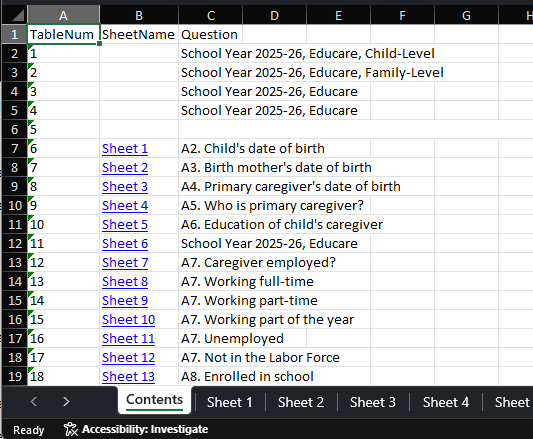
For quick navigation, the first tab of the excel report contains a table of contents with links to the tab containing response data for that question. Also, the top of each sheet with data has a link back to the table of contents tab in cell A1.
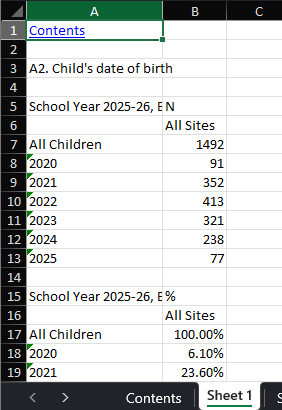
The counts and percentages are in separate tables in each sheet, unlike the .rtf files.
If you have questions about excel file reports, please reach out to Keil Jones or Kalen Donahue.