School Information Form
About the School Information form
The School Information Form was created to collect school-level information, such as:
- Overall capacity and enrollment
- Numbers of children and families, both Educare and non-Educare
- Classrooms
- Staffing, vacancies
The form will allow more systematic collection of basic descriptive information about the Network, including providing useful denominators for the Educare National Evaluation.
For each Educare school, data should be submitted representing capacity, enrollment, and staffing on October 15 (submit by January 31) and April 15 (submit by July 31). Additional forms can be submitted if desired.
Text fields within the form allow you to add information about your site’s context, challenges obtaining information, etc.
A downloadable version of the form can be found on the Study Tools and Forms section of this dashboard. Use the Forms tab of the EIS website to submit your data.

Tips for using ChildPlus to complete the School Information Form
Colleagues at Educare Oklahoma City were pilot testers of the school information form and have provided a version of the School Information form with tips for how they were able to access that information from ChildPlus.
Entering data
School Information Form data should be entered to the FPG EIS site
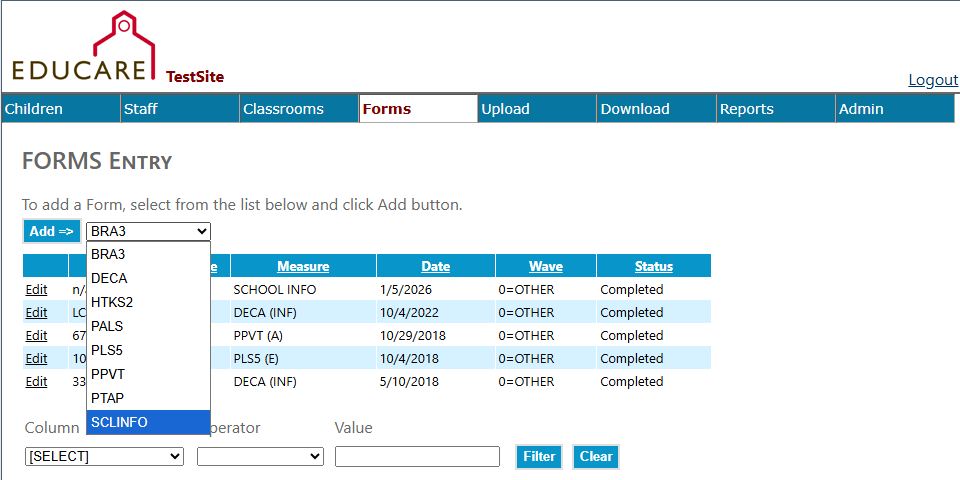
To enter School Information Form data:
- Log-in to the EIS site with your UNC ONYEN and password
- Click on the Forms tab along the top of the page
- In the drop-down menu, choose SCLINFO
- Click the Add button