
Fall and Spring Semesters
Each semester (or once per year, adding fall and spring at the same time), add a semester instance for each active classroom. You can do it manually (one at a time for each classroom) or via upload. This allows you to represent the class for that particular semester – staff, children enrolled, classroom observations, or Educare status.
Manual
Go to the Classrooms tab and click on Edit on the row for the classroom you are editing.
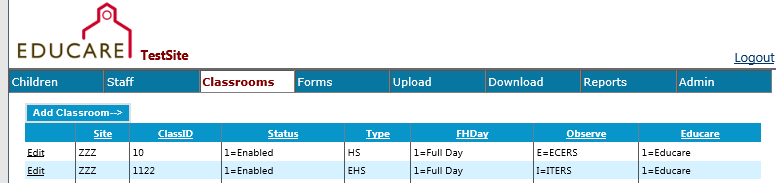
Click the Add Semester button. Choose a school year and semester from the dropdown menus.
Note: the Educare National Evaluation no longer requires the Early Childhood Environment Rating Scale (ECERS), but the Observe field still exists as a shorthand for the type of observation data collection (by age level). (PreK CLASS is the actual measure now used for this age level.)
Upload
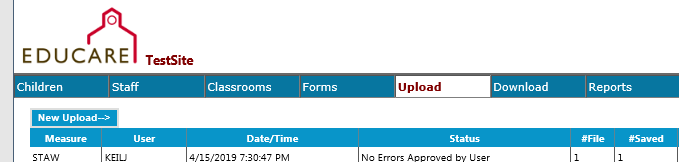
Click on the New Upload button. From the New Upload page, you will select Class [Semester Properties] from the Select Measure dropdown. You are able to download a Class Semester Properties template (and a number of other templates) and then upload the template once it is completed.
Go to the Documents section of FPG’s SharePoint site to find a data dictionary of the variables to use in uploads (codes for status, etc.). The data dictionaries are in the Educareis Website Dictionaries folder.
It is important to connect Educare children, teaching staff, and family engagement staff to classrooms. The Educare dataset is structured to expect each child to be connected to a fall roster and a spring roster. At some programs, it is not possible to do this until the semester has been underway for a little while. Fall and spring rosters should be entered/uploaded by July 31. While we expect all data from a school year to be entered/uploaded by July 31, this is an especially important deadline for rosters:
- In August*, FPG generates a set of error reports for each LEP team. These errors should be cleaned up by the end of August so that when spreadsheets are created in September* for each LEP to complete with their site’s attendance and disability data (see chapter X), the spreadsheets contain all children enrolled the previous year, and only those children. If children are not assigned to rosters, the list of errors will be enormous.
- In early August, FPG must open the survey website for the upcoming school year. Once the site rolls over to a new year, LEPs can still make corrections and add information to previous years, however, the Upload feature will only upload information into the current school year**.
* A few sites shift this timeline by a month (error corrections complete by the end of September, attendance and disability data in October)
** A fall Back to the Future date is scheduled to allow uploads for the previous school year.